Free 2-month Coolshop trial for Koongo users!
Coolshop Marketplace offers 2 months of Coolshop Subscription to all clients of Koongo for FREE. Interested in Coolshop channel? Contact us at Koongo support will guide you through the Coolshop channel integration.
Coolshop started in Denmark in 2002 as a small online retailer, primarily selling Video Games and Consoles to the Danish market. Soon Coolshop expanded out and became one of the most innovative and growing businesses in Danish e-commerce. One of the core values of Coolshop is always to push the limits, always seek new opportunities and be on the frontier of the technological development.
Coolshop Marketplace is the first real Scandinavian Marketplace, which stretches out into seven countries - Denmark, Norway, Sweden, Finland, Germany, Netherlands and United Kingdom.
The goal for Coolshop Marketplace is to offer low commissions for Vendors, high transparency for Vendors and Customers as well as keeping the business model very simple. The Marketplace Platform is highly scalable, so Vendors only have to provide one price including VAT, and they will be able to sell in all 7 markets, because the Platform handles VAT and currency conversion. This Marketplace is unique due to 7 countries, which can be targeted with only 1 registration*, easy access to the Nordic countries and promotes freedom of choice for the individual Vendor.
*Countries outside EU require an individual registration. E.g. Norway.
 Germania
 Danimarca
 Finlandia
 Regno Unito
 Paesi Bassi
 Norvegia
 Svezia
Il Coolshop canale é connesso a Koongo con un feed del prodotto.
Koongo aiuta i venditori online ad avere successo sui marketplace e sui siti web di confronto automatizzando la sincronizzazione dei dati e degli ordini. Permette ai venditori di vendere su più piattaforme ma con meno fatica.
Collega i tuoi canali preferiti in 4 semplici passi:
The Coolshop product feed is used to upload product data to Coolshop channel. The Coolshop offer feed is used to update product price and stock information.
Sign up for an account on Coolshop
Add the Coolshop product feed to your profile grid.
Note: For Coolshop, the English title, description, primary color and color attributes are mandatory. If you want to export also other languages(e.g. DK) title and description attribute you need to add 2 product feeds - one for EN (EN storeview) and one for local language (e.g. DK storeview). The number of products needs to be the same in both storeviews!!! The product data need to be merged into one of the feed and sent to Coolshop for review.
To get proper Coolshop categories for your products you need to map your store categories to Coolshop categories.
Please check if all attributes below are mapped to store attributes properly.
You need to merge the product data from the EN product feed to local language feed (e.g. DK). You can just download both feeds, open them (e.g. in Microsoft Excel) and copy product data from EN file to the local language one.
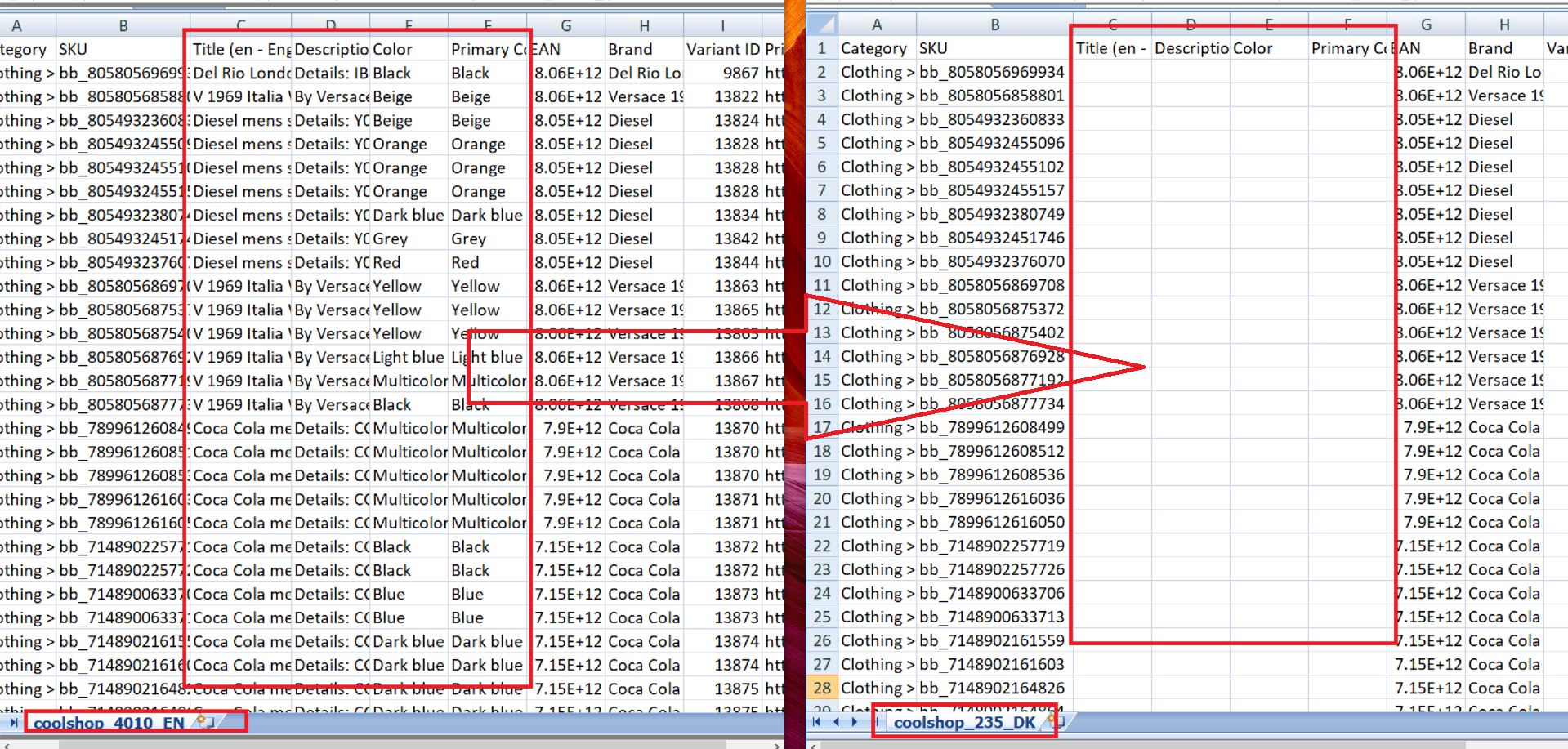
You need to contact Coolshop integration support team and send them the merged Coolshop product feed for review.
Add the Coolshop offer feed to your profile grid.
Please check if all attributes below are mapped to store attributes properly.
You need to contact Coolshop integration support team and send the Coolshop offer feed for review.
Hai difficoltá con l'impostazione del canale? Scrivici a support@koongo.com. Saremo felici di aiutarti


 IT
IT